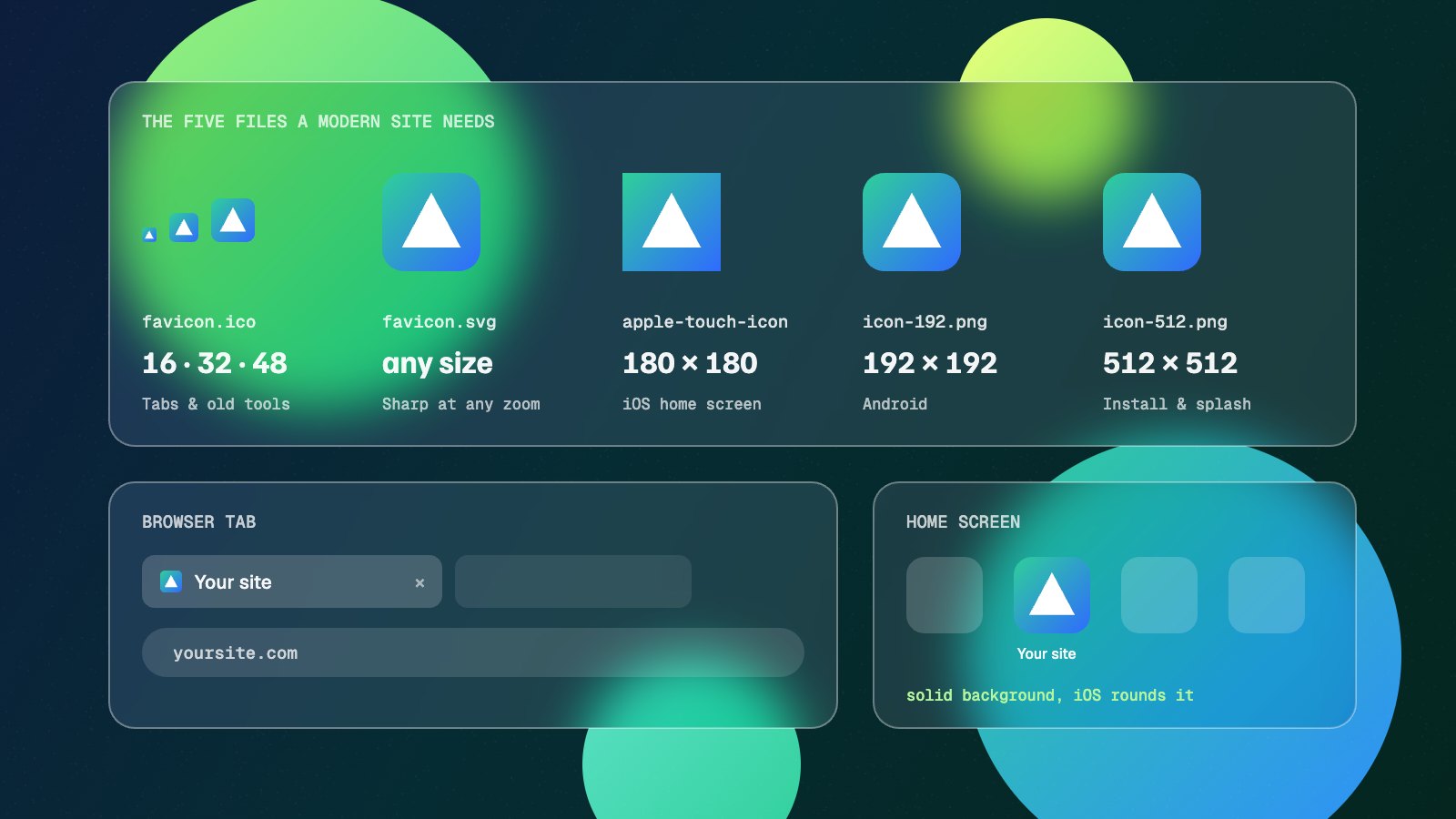
Favicon sizes are one of those topics where old advice never dies. Search for it and you will find lists of twenty or more icons, Windows tile images and XML files that modern browsers ignore. In practice a current site needs about five files.
This guide lists the favicon sizes that still matter, explains what each one is for, gives you the HTML to paste in, and covers what Google needs to show your icon in search results.
Key takeaways
- You need a
favicon.ico, a 180×180 Apple touch icon, and 192×192 and 512×512 PNGs in a web app manifest. An SVG favicon is a worthwhile extra. - SVG favicons now work in every major browser, including Safari since version 26.
- Give the Apple touch icon a solid background. iOS fills transparent areas with black.
- For Google search, the icon must be square, crawlable and at a stable URL. Larger than 48×48 is recommended.
- Windows tiles,
browserconfig.xmland dozens of PNG sizes are no longer needed.
The favicon sizes you actually need
| File | Size | Used by |
|---|---|---|
| favicon.ico | 16, 32 and 48px inside one file | Browser tabs, bookmarks, older browsers and tools that request /favicon.ico directly |
| favicon.svg (optional) | Any (vector) | Sharp tab icons at any zoom level in current browsers |
| apple-touch-icon.png | 180×180 | iPhone and iPad home screens |
| icon-192.png | 192×192 | Android home screen, listed in the manifest |
| icon-512.png | 512×512 | Android splash screens and app install prompts, listed in the manifest |
Everything else is optional. Some generators also output 16×16 and 32×32 PNGs, which do no harm, but the ICO file already covers those sizes.
favicon.ico is still worth having
ICO is an old format, but it has one big advantage: lots of software asks for /favicon.ico at the root of your domain without reading your HTML at all. Feed readers, some link preview services and older browsers all do this. Without the file, those requests return a 404 and the icon is blank.
An ICO file can hold several sizes in one file. 16, 32 and 48px covers standard and high-density screens, and the 48px version also meets Google’s recommended minimum.
SVG favicons now work everywhere
For years, SVG favicons worked in Chrome, Edge and Firefox but not Safari. Safari 26, released in 2025, added SVG support for icons throughout its interface, including favicons, so a vector favicon now works in every major browser.
An SVG stays sharp at any size and can even adapt to dark mode with a media query inside the file:
<svg xmlns="http://www.w3.org/2000/svg" viewBox="0 0 32 32">
  <style>
    path { fill: #1d1b4b; }
    @media (prefers-color-scheme: dark) {
      path { fill: #ffffff; }
    }
  </style>
  <path d="M4 4h24v24H4z"/>
</svg>
Keep the ICO alongside it for older browsers and tools that only look for /favicon.ico. If your logo is complex, simplify it for small sizes. Fine detail disappears at 16px whatever the format.
The Apple touch icon
When someone adds your site to their iPhone or iPad home screen, iOS uses the Apple touch icon. One 180×180 PNG covers current devices. iOS applies its own rounded corners, so supply a square image.
Two things trip people up. iOS fills any transparent area with black, so a transparent logo usually ends up on a black square. Give this icon a solid background colour. And leave some padding around the logo so it does not touch the edges once the corners are rounded.
Android and the web app manifest
Android uses icons listed in a web app manifest, a small JSON file linked from your HTML. Chrome looks for 192×192 and 512×512 icons in it when deciding whether your site can be installed as an app.
{
  "name": "Your Site",
  "short_name": "Site",
  "icons": [
    { "src": "/icon-192.png", "sizes": "192x192", "type": "image/png" },
    { "src": "/icon-512.png", "sizes": "512x512", "type": "image/png" }
  ],
  "theme_color": "#1d1b4b",
  "background_color": "#ffffff",
  "display": "standalone"
}
Android can also crop icons into circles and other shapes. If you add a "purpose": "maskable" icon, keep the important part of the logo inside the central 80% of the image so nothing is cut off.
The HTML to add to your head
<link rel="icon" href="/favicon.ico" sizes="32x32">
<link rel="icon" href="/favicon.svg" type="image/svg+xml">
<link rel="apple-touch-icon" href="/apple-touch-icon.png">
<link rel="manifest" href="/site.webmanifest">
The sizes="32x32" on the ICO line is deliberate. Without it, some browsers pick the ICO even when an SVG is available. If you are not using an SVG, drop the second line.
Put the files in the root of your site, the same folder as your home page, so the paths above work and /favicon.ico is where tools expect it.
Favicons in Google search results
Google shows a favicon next to your site name in search results, which makes a clear, recognisable icon worth getting right. Google’s guidelines ask for:
- A square icon. The minimum is 8×8px, but larger than 48×48px is recommended so it looks good everywhere it appears.
- A stable URL that does not change often.
- An icon file and home page that Googlebot is allowed to crawl.
- One favicon per hostname. A subdomain can have its own, but a subfolder such as /blog/ cannot.
After changing your favicon, Google can take anywhere from several days to several weeks to pick it up. Requesting indexing of your home page in Search Console can speed that along.
What you can safely drop
browserconfig.xmlandmsapplicationmeta tags for Windows Start screen tiles.rel="mask-icon"pinned tab icons, which current Safari no longer needs.- Long lists of Apple touch icons at 57, 72, 114, 152px and so on. One 180×180 icon is enough.
- Separate Android icons at 36, 48, 72 and 96px. The manifest’s 192 and 512px icons cover them.
Tip: Browsers cache favicons aggressively. If an updated icon will not show, open the favicon URL directly and hard refresh, or test in a private window. For a site-wide change, renaming the files or adding a version query string forces a fresh download.
Make the whole set from one logo
You do not need to export each size by hand. Drop a square logo of at least 512×512px, or an SVG, into the favicon generator. It builds the ICO, the Apple touch icon with a solid background, the Android icons and the manifest, previews them in a browser tab and on a phone home screen, and gives you the HTML. Everything runs in your browser. If your logo needs converting first, the image converter can turn an SVG into a high-resolution PNG.